Install Clear NDR and Ship Events to an External Elasticsearch 9.x
In this article, we will introduce how to deploy Clear NDR Community with stamusctl and ship selected events (alert, flow, http, tls) to an external Elasticsearch 9.x cluster as data streams to monitor your network.
Clear NDR Community (the successor of SELKS) is an open-source Network Detection and Response stack from Stamus Networks, built around Suricata, Scirius, OpenSearch, Arkime and EveBox. Out of the box it keeps everything in a local OpenSearch.
In many SOCs, however, the SIEM is a separate Elasticsearch cluster, and you want the important network events there too, without breaking the local NDR UI.
The result of this guide:
- Local OpenSearch keeps receiving all Suricata events, so Scirius, EveBox and the dashboards work as usual.
- External Elasticsearch receives only
alert,flow,httpandtls, written into data streamslogs-nsm.<event_type>-<namespace>with logsdb mode and an ILM retention policy. - Each destination has its own buffer, so if the SIEM is down the local stack is not affected (and vice versa).
Architecture
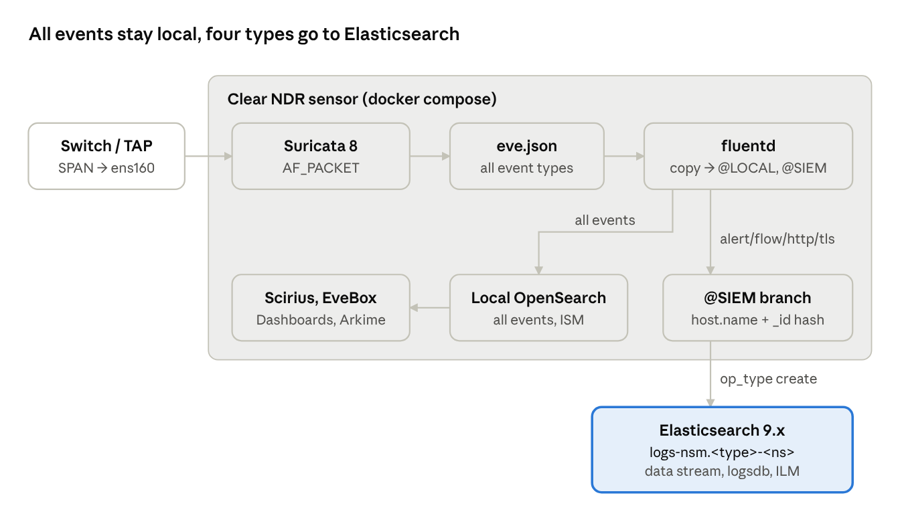
The stream splits right after fluentd, and each branch has its own file buffer. Only the @SIEM branch filters event types, sets host.name and generates a document _id before writing to the data streams.
Installation Environment and Versions
- OS: Ubuntu 22.04 / 24.04 LTS
- Clear NDR Community
- Elasticsearch: v9
The lab uses one sensor and an existing Elasticsearch cluster (for example the one from my Elasticsearch 9.x.x Installation and Cluster Setup post):
| No. | Host name | IP | Role |
|---|---|---|---|
| #1 | ndr-sensor | 192.168.234.140 (mgmt ens33), sniff ens160 (no IP) |
Clear NDR |
| #2 | es-node1 | 192.168.234.128 | Elasticsearch |
| #3 | es-node2 | 192.168.234.129 | Elasticsearch |
| #4 | es-node3 | 192.168.234.130 | Elasticsearch |
Recommended sensor sizing: 8 vCPU, 16 GB RAM, 500 GB SSD for /var/lib/docker.
Prepare the Sniffing Interface
The sniffing NIC must come UP after every reboot. If it does not, the Suricata container keeps restarting silently and you lose visibility without any alert.
Declare the interface with netplan:
sudo tee /etc/netplan/60-sniff.yaml > /dev/null <<'EOF'
network:
  version: 2
  ethernets:
    ens160:
      dhcp4: false
      dhcp6: false
      accept-ra: false
      link-local: []
      optional: true
EOF
sudo chmod 600 /etc/netplan/60-sniff.yaml
sudo netplan try && sudo netplan apply
Disable offloading (GRO/LRO merge packets and hurt detection) and enable promiscuous mode at boot:
sudo apt-get install -y ethtool
sudo tee /etc/systemd/system/sniff-nic@.service > /dev/null <<'EOF'
[Unit]
Description=Prepare sniffing interface %i for Suricata
After=network-online.target
Wants=network-online.target

[Service]
Type=oneshot
ExecStart=/usr/sbin/ip link set %i up promisc on
ExecStart=-/usr/sbin/ethtool -K %i gro off lro off tso off gso off rx off tx off
RemainAfterExit=yes

[Install]
WantedBy=multi-user.target
EOF
sudo systemctl daemon-reload
sudo systemctl enable --now sniff-nic@ens160
Verify that mirrored traffic arrives in both directions:
ip -br link show ens160
sudo tcpdump -ni ens160 -c 20 -q
Note: If the sensor is a VMware VM, the port group receiving the mirror must have Promiscuous mode = Accept, and the vNIC must be ticked Connected and Connect at power on.
Install Docker
curl -fsSL https://get.docker.com | sudo sh
sudo systemctl enable --now docker
docker compose version
Clear NDR Installation
Download stamusctl
stamusctl generates the Docker Compose files into a config folder (config in the current directory by default), so run it from /opt to get /opt/config:
cd /opt
sudo wget https://dl.clearndr.io/stamusctl-linux-amd64
sudo chmod +x stamusctl-linux-amd64
sudo mv stamusctl-linux-amd64 /usr/local/bin/stamusctl
Initialize and Start the Stack
Set the sniffing interface and the OpenSearch memory at init time, so the values survive a later re-generation:
cd /opt
sudo stamusctl compose init suricata.interfaces=ens160 opensearch.memory=4g
sudo stamusctl config get | grep -iE 'interfaces|memory'
sudo stamusctl compose up -d
docker ps --format 'table {{.Names}}\t{{.Status}}'
After a few minutes, opensearch, opensearch-dashboards, suricata, fluentd, scirius, arkime, evebox, nginx, db and rabbitmq should be Up/healthy. Containers named setup-*, ssl-keygen and ownership-fix are one-shot jobs, so Exited (0) is expected. The web UI is at https://192.168.234.140.
The files we will touch later:
| File | Content |
|---|---|
/opt/config/docker-compose.yaml |
Root file, includes the others |
/opt/config/events-stack/events-stack.compose.yaml |
opensearch, opensearch-dashboards, fluentd services |
/opt/config/events-stack/fluentd/fluent.conf |
fluentd pipeline |
/opt/config/containers-data/suricata/logs/eve.json |
Suricata EVE log read by fluentd |
Note: Re-running stamusctl compose init or upgrading the template regenerates these files and overwrites manual changes. Back up /opt/config first. Never use stamusctl compose down -v: -v deletes the volumes, including all OpenSearch data.
Post-install Checks
Check the OpenSearch heap (if the opensearch.memory key did not apply, change -Xms2g -Xmx2g in events-stack.compose.yaml and run docker compose up -d opensearch):
cd /opt/config
OS="docker compose exec -T opensearch curl -s http://localhost:9200"
$OS/_cat/nodes?h=heap.max,heap.percent\&v
==============================================================================
heap.max heap.percent
     4gb           55
Make sure the retention job (ISM) ran successfully. Without it, daily indices accumulate until the heap is full:
docker ps -a --format '{{.Names}} {{.Status}}' | grep setup-ism     # must be Exited (0)
$OS/_plugins/_ism/policies?pretty | grep policy_id
The local OpenSearch is single-node, so set replicas to 0:
$OS -XPUT "/_all/_settings" -H 'Content-Type: application/json' -d '{"index":{"number_of_replicas":0}}'
Finally, confirm Suricata is capturing and not restarting:
docker compose exec suricata suricatasc -c "iface-stat ens160"
docker compose exec suricata suricatasc -c ruleset-stats
docker inspect $(docker compose ps -q suricata) --format 'Restarts={{.RestartCount}}'
Elasticsearch Preparation
Before fluentd sends anything, create four objects on the Elasticsearch side: an ILM policy, a component template, an index template with data streams enabled, and a write-only user. Run the requests below in Kibana → Dev Tools with an admin account. In this guide the namespace is default, so the data streams will be logs-nsm.alert-default, logs-nsm.flow-default, and so on. Use your own namespace (lowercase, no -) if you run several sensors or tenants.
ILM Policy
Roll over daily and delete after 30 days (adjust to your retention requirement):
PUT _ilm/policy/nsm
{
  "policy": {
    "phases": {
      "hot":    { "actions": { "rollover": { "max_age": "1d", "max_primary_shard_size": "50gb" } } },
      "delete": { "min_age": "30d", "actions": { "delete": {} } }
    }
  }
}
Component Template
Suricata-specific mappings plus the ILM link:
PUT _component_template/nsm@custom
{
  "template": {
    "settings": { "index.lifecycle.name": "nsm" },
    "mappings": {
      "properties": {
        "src_ip":  { "type": "ip" },
        "dest_ip": { "type": "ip" },
        "geoip": {
          "properties": {
            "ip":        { "type": "ip" },
            "location":  { "type": "geo_point" },
            "latitude":  { "type": "half_float" },
            "longitude": { "type": "half_float" }
          }
        }
      }
    }
  },
  "_meta": { "description": "Suricata NSM custom mappings" }
}
On a single-node cluster, also add "index.number_of_replicas": 0 to settings.
Index Template (Data Stream)
The built-in logs template matches logs-*-* with priority 100, so ours uses priority 200 to win. Composing logs@settings enables logsdb mode, and ecs@mappings gives dynamic ECS mappings:
PUT _index_template/logs-nsm
{
  "index_patterns": ["logs-nsm.*-*"],
  "data_stream": {},
  "priority": 200,
  "composed_of": ["logs@mappings", "logs@settings", "ecs@mappings", "nsm@custom"],
  "_meta": { "description": "Suricata data streams (alert/flow/http/tls)" }
}

POST _index_template/_simulate_index/logs-nsm.flow-default
The simulate result must show "mode": "logsdb" and "name": "nsm" under lifecycle.
Writer Role and User
create_doc and auto_configure are enough to write and auto-create the data streams; monitor lets the fluentd plugin read the cluster version:
POST _security/role/nsm_writer
{
  "cluster": ["monitor"],
  "indices": [
    { "names": ["logs-nsm.*-*"], "privileges": ["create_doc", "auto_configure", "view_index_metadata"] }
  ]
}

POST _security/user/svc_nsm
{
  "password": "<strong random password>",
  "roles": ["nsm_writer"],
  "full_name": "Clear NDR ingest"
}
Note: Do not use elastic or any personal/superuser account for ingest. The password ends up in a file on the sensor.
Fluentd Configuration
The Clear NDR fluentd container already tails eve.json. We change it to split the stream into two independent branches with labels: @LOCAL (everything to OpenSearch) and @SIEM (four event types to Elasticsearch). Back up first:
sudo tar czf /root/clearndr-config-$(date +%F-%H%M).tgz /opt/config
Credentials File
Create /opt/config/events-stack/fluentd/siem.env. One KEY=value per line, no quotes, no export. Several nodes can be listed comma-separated in SIEM_HOST:
SIEM_HOST=http://192.168.234.128:9200,http://192.168.234.129:9200,http://192.168.234.130:9200
SIEM_USER=svc_nsm
SIEM_PASS=<password>
sudo chmod 600 /opt/config/events-stack/fluentd/siem.env
Compose Service
In events-stack/events-stack.compose.yaml, add a buffer volume to the top-level volumes: block (keep the suffix stamusctl generated for your install):
volumes:
    # ... existing volumes
    fluentd-buffer:
        name: fluentd-buffer-<suffix>
Then replace the fluentd service (4-space indentation, keep your generated container_name). The stock service has no restart, no env_file and no persistent buffer, so it does not come back after a reboot and loses buffered events on recreate:
    fluentd:
        image: ghcr.io/stamusnetworks/stamus-images/fluentd:1.16
        user: root
        container_name: config-fluentd-<suffix>
        restart: unless-stopped
        command: fluentd -c /fluentd/etc/fluent.conf
        env_file:
            - fluentd/siem.env
        configs:
            - source: fluentd-config
              target: /fluentd/etc/fluent.conf
            - source: fluentd-template
              target: /fluentd/etc/template.json
        volumes:
            - fluentd-pos:/fluentd/log/td-agent
            - fluentd-buffer:/fluentd/buffer
            - /opt/config/containers-data/suricata/logs:/var/log/suricata:ro
        depends_on:
            opensearch:
                condition: service_healthy
        networks:
            network:
fluent.conf
Replace /opt/config/events-stack/fluentd/fluent.conf entirely. Change ndr-sensor and default to your sensor name and namespace. To send more event types (for example dns), only edit the pattern regex.
<system>
  log_level warn
</system>

<label @FLUENT_LOG>
  <match fluent.**>
    @type null
  </match>
</label>

# ======================= INPUT =======================
<source>
  @type tail
  path /var/log/suricata/eve*.json
  pos_file /fluentd/log/td-agent/eve-nsm-0.json.pos
  tag suricata
  read_from_head false
  <parse>
    @type json
    time_key timestamp
    time_format %Y-%m-%dT%H:%M:%S.%N%z
    keep_time_key true
  </parse>
</source>

# ======================= GEOIP =======================
<filter suricata>
  @type geoip
  geoip_lookup_keys src_ip
  <record>
    geoip.location   '{ "lat" : ${location.latitude["src_ip"]}, "lon" : ${location.longitude["src_ip"]} }'
    geoip.latitude   ${location.latitude["src_ip"]}
    geoip.longitude  ${location.longitude["src_ip"]}
    geoip.ip         ${ip["src_ip"]}
  </record>
  skip_adding_null_record true
</filter>

<filter suricata>
  @type geoip
  geoip_lookup_keys dest_ip
  <record>
    geoip.location   '{ "lat" : ${location.latitude["dest_ip"]}, "lon" : ${location.longitude["dest_ip"]} }'
    geoip.latitude   ${location.latitude["dest_ip"]}
    geoip.longitude  ${location.longitude["dest_ip"]}
    geoip.ip         ${ip["dest_ip"]}
  </record>
  skip_adding_null_record true
</filter>

# ======================= ECS FIELDS (common) =======================
<filter suricata>
  @type record_transformer
  enable_ruby true          # missing keys become null instead of literal placeholders
  <record>
    event.kind                 event
    event.module               suricata
    observer.type              nids
    observer.name              ndr-sensor
    observer.ingress.interface ${record["in_iface"]}
    source.ip                  ${record["src_ip"]}
    source.port                ${record["src_port"]}
    destination.ip             ${record["dest_ip"]}
    destination.port           ${record["dest_port"]}
    network.transport          ${record["proto"]}
    network.protocol           ${record["app_proto"]}
    network.community_id       ${record["community_id"]}
  </record>
</filter>

# ======================= ROUTING =======================
<match suricata>
  @type copy
  copy_mode shallow
  <store>
    @type relabel
    @label @LOCAL
  </store>
  <store>
    @type relabel
    @label @SIEM
  </store>
</match>

# ---------- Local OpenSearch: ALL events ----------
<label @LOCAL>
  <match **>
    @type opensearch
    hosts opensearch
    port 9200
    scheme http
    logstash_format true
    logstash_prefix logstash-${event_type}
    template_name template_fluentd
    template_file /fluentd/etc/template.json
    suppress_type_name true
    reconnect_on_error true
    reload_connections false
    reload_on_failure false
    request_timeout 30s
    log_os_400_reason true
    <buffer event_type>
      @type file
      path /fluentd/buffer/local
      flush_mode interval
      flush_interval 5s
      flush_thread_count 4
      chunk_limit_size 8MB
      total_limit_size 1GB
      overflow_action drop_oldest_chunk
      retry_type exponential_backoff
      retry_max_interval 60s
      retry_forever true
      flush_at_shutdown true
    </buffer>
  </match>
</label>

# ---------- External Elasticsearch: data streams logs-nsm.<event_type>-default ----------
<label @SIEM>
  <filter **>
    @type grep
    <regexp>
      key event_type
      pattern /^(alert|flow|http|tls)$/
    </regexp>
  </filter>

  # Data stream / logsdb fields (SIEM branch only)
  <filter **>
    @type record_transformer
    enable_ruby true
    remove_keys host                       # Suricata's "host" string conflicts with host.name
    <record>
      host.name              ndr-sensor
      data_stream.type       logs
      data_stream.dataset    nsm.${record["event_type"]}
      data_stream.namespace  default
      event.dataset          nsm.${record["event_type"]}
    </record>
  </filter>

  # _id = content hash: required for op_type=create, also de-duplicates retries
  <filter **>
    @type elasticsearch_genid
    hash_id_key _hash
    use_entire_record true
    hash_type sha1
  </filter>

  <match **>
    @type elasticsearch
    hosts "#{ENV['SIEM_HOST']}"
    user "#{ENV['SIEM_USER']}"
    password "#{ENV['SIEM_PASS']}"
    ssl_verify false                       # use https + ca_file in production
    # Workaround for elasticsearch-api 9.2.0 (see Troubleshooting)
    custom_headers {"Content-Type":"application/vnd.elasticsearch+json; compatible-with=9","Accept":"application/vnd.elasticsearch+json; compatible-with=9"}
    suppress_type_name true
    reconnect_on_error true
    reload_connections false
    reload_on_failure false
    request_timeout 30s
    log_es_400_reason true

    logstash_format false
    index_name logs-nsm.${event_type}-default
    write_operation create
    id_key _hash
    remove_keys _hash
    emit_error_for_missing_id true
    include_timestamp true

    <buffer event_type>
      @type file
      path /fluentd/buffer/siem
      flush_mode interval
      flush_interval 5s
      flush_thread_count 4
      chunk_limit_size 8MB
      total_limit_size 4GB
      overflow_action drop_oldest_chunk
      retry_type exponential_backoff
      retry_max_interval 60s
      retry_forever true
      flush_at_shutdown true
    </buffer>
  </match>
</label>

# ======================= REJECTED RECORDS =======================
<label @ERROR>
  <match **>
    @type file
    path /fluentd/buffer/rejected/${tag}
    append true
    <buffer tag,time>
      @type file
      path /fluentd/buffer/rejected/buf
      timekey 1h
      timekey_wait 1m
    </buffer>
  </match>
</label>
Note: Three lines in the @SIEM branch are not optional: custom_headers (without it every flush fails), id_key _hash (without it every record is silently dropped), and remove_keys host (without it every document is rejected by the data stream mapping). Each one is explained in Troubleshooting.
Start and Verify
First check that Elasticsearch is reachable from the Docker network fluentd uses, not only from the host. The helper below reuses siem.env, so no password is typed on the command line:
cd /opt/config
NET=$(docker network ls --format '{{.Name}}' | grep clearndr)
siem() { docker run --rm --network "$NET" --env-file events-stack/fluentd/siem.env --entrypoint sh curlimages/curl:8.13.0 -c "$1"; }
siem 'curl -s -u "$SIEM_USER:$SIEM_PASS" "${SIEM_HOST%%,*}/_security/_authenticate?filter_path=username,roles"'
==============================================================================
{"username":"svc_nsm","roles":["nsm_writer"]}
Recreate only the fluentd container (do not up -d the whole stack):
docker compose config >/dev/null && echo "compose OK"
docker compose up -d --force-recreate fluentd
docker compose exec fluentd sh -c 'echo $SIEM_USER; ls /fluentd/buffer'
After 2–3 minutes, check fluentd and the data streams:
docker compose logs --since 3m fluentd 2>&1 | grep -iE 'failed|error|reject|missing' | tail -5
docker compose exec fluentd sh -c 'du -sh /fluentd/buffer/*'
siem 'curl -s -u "$SIEM_USER:$SIEM_PASS" "${SIEM_HOST%%,*}/_data_stream/logs-nsm*?filter_path=data_streams.name,data_streams.template,data_streams.ilm_policy,data_streams.index_mode&pretty"'
==============================================================================
{
  "data_streams" : [
    { "name" : "logs-nsm.flow-default", "template" : "logs-nsm", "ilm_policy" : "nsm", "index_mode" : "logsdb" },
    { "name" : "logs-nsm.http-default", "template" : "logs-nsm", "ilm_policy" : "nsm", "index_mode" : "logsdb" },
    { "name" : "logs-nsm.tls-default",  "template" : "logs-nsm", "ilm_policy" : "nsm", "index_mode" : "logsdb" }
  ]
}
Note: Backing indices are named .ds-logs-nsm.flow-default-YYYY.MM.DD-000001 and are hidden, so most index management tools do not list them. Look in Kibana → Stack Management → Index Management → Data Streams.
The alert data stream only appears with the first alert. To trigger one, run this from a host inside the mirrored segment (not from the sensor itself):
curl -s http://testmynids.org/uid/index.html
It fires GPL ATTACK_RESPONSE id check returned root (SID 2100498) from ET Open. Then:
siem 'curl -s -u "$SIEM_USER:$SIEM_PASS" "${SIEM_HOST%%,*}/logs-nsm.alert-default/_search?size=1&sort=@timestamp:desc&_source=@timestamp,alert.signature,source.ip,destination.ip&pretty"'
The svc_nsm role has no read privilege, so run this search in Kibana Dev Tools if it returns 403.
Conclusion
I introduced a way to keep Clear NDR working as a standalone NDR while forwarding the most useful Suricata events to an external Elasticsearch 9.x as proper data streams, with logsdb storage and ILM retention. The two-label fluentd pipeline keeps the local stack and the SIEM independent of each other. Hope you find it helpful!
Comments
Join the discussionNo comments yet. Be the first to comment.